StormTracker 137.1.0
Publisher Description


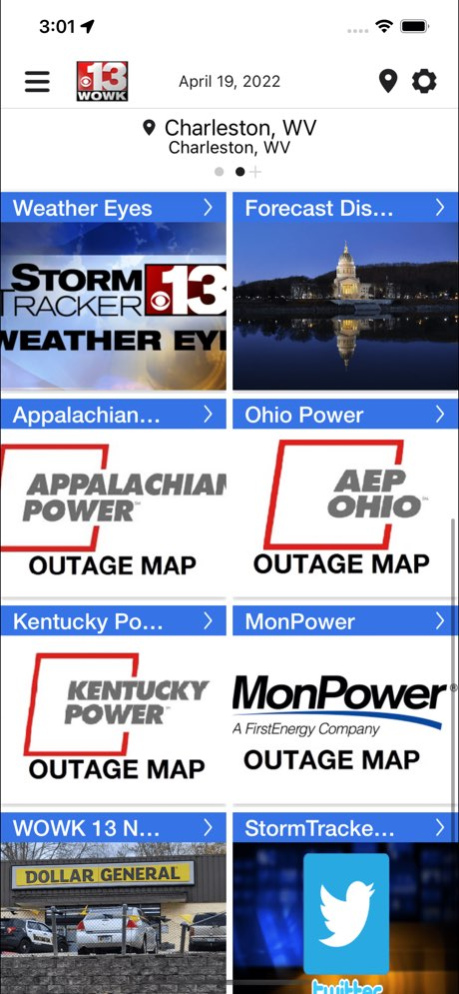
This app can save your life during severe weather! Get all the weather information you need, severe weather warnings, from the trusted source - Spencer Adkins and the StormTracker 13 Weather Team. Get instant access to your 7-day forecast, HD Dual Live Doppler interactive radar and the "Predictor" forecast model in this FREE app.
. Our team of 8 full-time meteorologists know the everything about weather that is so unique to the Kanawha Valley and West Virginia, Kentucky Ohio Tri-State region. That's more than 100 years of combined forecasting experience in this app.
. Enable notifications, and you'll know what's happening at your current location and be alerted to severe weather 24 hours a day.
. Use the new Stormtracker 13 interactive map you can see what's happening where you are and check on family members anywhere in the country!
. Watch latest video forecasts from the StormTracker 13 Weather Team.
CUSTOMIZED ALERTS
*Twisting Storm Alerts - Featuring the Baron Tornado Index, these exclusive alerts have a simple 1-to-10 ranking on the possibility of a tornado in an approaching storm. This ranking is more local and accurate than any system ever designed.
*Special StormTracker Alerts - Fully automated weather alerts, in your hand and on your phone are simple to use. These alerts are more specific than weather sirens. These can alert you up to 15 minutes before the storm hits!
*Breaking News Alerts: Keep informed with StormTracker 13 ALERT news updates on important stories near you.
*Lightning Alerts: Get real-time alerts for your GPS location and know where lightning strikes near you.
Version History Bug fixes and other enhancements 7.1.0 Jun 17 Here are the new features with this release!
-Dark mode
-Improved lapse speed and bar
-Past (2hrs) and real time as well as future radar (2hrs) combined in one product
-New stylized legends above the map 6.9.0 12/18/2023 Update to the mapping background in the radar tile and page to give it a new modern look. Boundaries, roads, cities display on top of radar data to make it easier to view your location on the map.
New look to the current conditions and forecast tile to make it more modern looking and easier for users to read weather data. Changes include a white background, colored icons, and larger text to make data easier to read.
Updated Current Conditions/Forecast Page. Updates include:
-Page opens to the ‘Overview’ tab which gives current conditions, 3 hour hourly forecast, the 7 day daily forecast, and access to the radar page
-The 'Currents' tab will give additional information on humidity percent, cloud cover, visibility, dew point, barometric pressure, and sunrise/sunset times.
-The 'Hourly' tab will give detailed weather information for the next 24 hours on the forecasted weather condition, temperature, pop and wind speed and direction.
-The 'Daily' tab will show the 7-day forecast in a manner that is much more similar to on-air 7-day forecasts with a detailed forecast for the next 7 days/nights below. 6.8.0 09/15/2022 Update to the mapping background in the radar tile and page to give it a new modern look. Boundaries, roads, cities display on top of radar data to make it easier to view your location on the map.
New look to the current conditions and forecast tile to make it more modern looking and easier for users to read weather data. Changes include a white background, colored icons, and larger text to make data easier to read.
Updated Current Conditions/Forecast Page. Updates include:
-Page opens to the ‘Overview’ tab which gives current conditions, 3 hour hourly forecast, the 7 day daily forecast, and access to the radar page
-The 'Currents' tab will give additional information on humidity percent, cloud cover, visibility, dew point, barometric pressure, and sunrise/sunset times.
-The 'Hourly' tab will give detailed weather information for the next 24 hours on the forecasted weather condition, temperature, pop and wind speed and direction.
-The 'Daily' tab will show the 7-day forecast in a manner that is much more similar to on-air 7-day forecasts with a detailed forecast for the next 7 days/nights below. 6.7.3 04/21/2022 Bug Fixes and other Enhancements 6.7.2 07/01/2021 Bug fixes and back end improvements 6.5.1 11/23/2020 Bug fixes and improvements 6.5.0 09/17/2020 - Current conditions tile updated with three-day forecast
- Radar tile updated with live radar
- Bug fixes and back-end changes to improve functionality and speed of the app 6.3.4 10/10/2019 Back end app incorporation with Firebase, as well as bug fixes and improvements. 6.1.2 04/02/2019 • Locations for forecast data/map data and Safety Net alerts are now all handled in a centralized location.
• The user’s selected locations are now consistent across forecasts and alerts, and don’t need to be managed independently.
• Safety Net alerts are now toggled on for the user’s location upon app install. New locations added also have Safety Net alerts automatically turned on.
• Users can now choose whether to receive alerts from each separate location.
• When a user clicks an alert notification, they are now taken to the map page showing the last viewed data product for that alert location.
• A new 7-day forecast includes a written forecast for both day and night time. 5.0.0 10/17/2018 *We love storms so much that we thought you needed a completely new app to track them!
*Allow alerts on your app...you’ll get lightning alerts when a strike occurs within 10 miles of your location!
*HUGE NEWS: View and report power outages with AEP and MonPower!
*View Predictor hour-by-hour so you can plan to make your next snow angel!
*Tweet us @StormTracker13
*We have a section to “Send Your Pics” directly to the StormTracker 13 Team!
*If you send us pizza, we’ll send you sunshine! 3.16.1 11/11/2017 We've squashed some bugs, made some improvements for your weather pleasure and we think this app rocks!
*Tweaked some icons to make them extra shiny!
*We've added our Twitter feed directly into the app.
*Welcome to fall and bring on the snow! 3.15.2 10/30/2016 *LIVE LIGHTNING TRACKING
Be sure to go to the menu and open Safety-Net Alerts, click "Enable" to get LIVE LIGHTNING alerts! The lightning alerts will tell you when lightning is within 10 miles of your location.
*We also enhanced our 7 Day forecasts.
*Bugs...we stomped on them. They're gone. 3.13.1 03/25/2016 *Enhanced alerts, go to the "Saf-T-Net Alerts" section and under the preferences area, hit "enable alerts" for the latest, real-time storm alerts!
+We also upgraded with more radar tools too!
+Enhanced radar with winter snow.
We sprayed for bugs, they're gone. :) 3.11.0 11/16/2015 We've updated custom storm alerts, be sure to turn them on in the section "Saf-T-Net Alerts".
We also did some bug squashing. We love squashing bugs. 3.10.4 10/23/2015 -Support for iOS 9.0
-All new layout and design
-Automated Push Alerts for severe weather
-Video forecasts added
-Support for submitting severe weather photos 3.10.0 10/21/2015 -> iPhone 5 screens supported
-> iOS6 libraries integrated
-> Maps page layout changed
-> Package size considerably decreased
-> Probability of Precipitation reformatted to present a more accurate Day 1-3 value
-> Multiple bug fixes 1.0.20121121 12/09/2012 1.0 10/24/2012
About StormTracker 13
The company that develops StormTracker 13 is Nexstar Broadcasting, Inc.. The latest version released by its developer is 7.1.0.
To install StormTracker 13 on your iOS device, just click the green Continue To App button above to start the installation process. The app is listed on our website since 2026-10-13 and was downloaded 5 times. We have already checked if the download link is safe, however for your own protection we recommend that you scan the downloaded app with your antivirus. Your antivirus may detect the StormTracker 13 as malware if the download link is broken.
How to install StormTracker 13 on your iOS device:
- Click on the Continue To App button on our website. This will redirect you to the App Store.
- Once the StormTracker 13 is shown in the iTunes listing of your iOS device, you can start its download and installation. Tap on the GET button to the right of the app to start downloading it.
- If you are not logged-in the iOS appstore app, you'll be prompted for your your Apple ID and/or password.
- After StormTracker 13 is downloaded, you'll see an INSTALL button to the right. Tap on it to start the actual installation of the iOS app.
- Once installation is finished you can tap on the OPEN button to start it. Its icon will also be added to your device home screen.
Program Details
System requirements
Download information
Pricing
Version History
version 7.1.0
posted on 2026-10-13
Version History Bug fixes and other enhancements 7.1.0 Jun 17 Here are the new features with this release!
-Dark mode
-Improved lapse speed and bar
-Past (2hrs) and real time as well as future radar (2hrs) combined in one product
-New stylized legends above the map 6.9.0 12/18/2023 Update to the mapping background in the radar tile and page to give it a new modern look. Boundaries, roads, cities display on top of radar data to make it easier to view your location on the map.
New look to the current conditions and forecast tile to make it more modern looking and easier for users to read weather data. Changes include a white background, colored icons, and larger text to make data easier to read.
Updated Current Conditions/Forecast Page. Updates include:
-Page opens to the ‘Overview’ tab which gives current conditions, 3 hour hourly forecast, the 7 day daily forecast, and access to the radar page
-The 'Currents' tab will give additional information on humidity percent, cloud cover, visibility, dew point, barometric pressure, and sunrise/sunset times.
-The 'Hourly' tab will give detailed weather information for the next 24 hours on the forecasted weather condition, temperature, pop and wind speed and direction.
-The 'Daily' tab will show the 7-day forecast in a manner that is much more similar to on-air 7-day forecasts with a detailed forecast for the next 7 days/nights below. 6.8.0 09/15/2022 Update to the mapping background in the radar tile and page to give it a new modern look. Boundaries, roads, cities display on top of radar data to make it easier to view your location on the map.
New look to the current conditions and forecast tile to make it more modern looking and easier for users to read weather data. Changes include a white background, colored icons, and larger text to make data easier to read.
Updated Current Conditions/Forecast Page. Updates include:
-Page opens to the ‘Overview’ tab which gives current conditions, 3 hour hourly forecast, the 7 day daily forecast, and access to the radar page
-The 'Currents' tab will give additional information on humidity percent, cloud cover, visibility, dew point, barometric pressure, and sunrise/sunset times.
-The 'Hourly' tab will give detailed weather information for the next 24 hours on the forecasted weather condition, temperature, pop and wind speed and direction.
-The 'Daily' tab will show the 7-day forecast in a manner that is much more similar to on-air 7-day forecasts with a detailed forecast for the next 7 days/nights below. 6.7.3 04/21/2022 Bug Fixes and other Enhancements 6.7.2 07/01/2021 Bug fixes and back end improvements 6.5.1 11/23/2020 Bug fixes and improvements 6.5.0 09/17/2020 - Current conditions tile updated with three-day forecast
- Radar tile updated with live radar
- Bug fixes and back-end changes to improve functionality and speed of the app 6.3.4 10/10/2019 Back end app incorporation with Firebase, as well as bug fixes and improvements. 6.1.2 04/02/2019 • Locations for forecast data/map data and Safety Net alerts are now all handled in a centralized location.
• The user’s selected locations are now consistent across forecasts and alerts, and don’t need to be managed independently.
• Safety Net alerts are now toggled on for the user’s location upon app install. New locations added also have Safety Net alerts automatically turned on.
• Users can now choose whether to receive alerts from each separate location.
• When a user clicks an alert notification, they are now taken to the map page showing the last viewed data product for that alert location.
• A new 7-day forecast includes a written forecast for both day and night time. 5.0.0 10/17/2018 *We love storms so much that we thought you needed a completely new app to track them!
*Allow alerts on your app...you’ll get lightning alerts when a strike occurs within 10 miles of your location!
*HUGE NEWS: View and report power outages with AEP and MonPower!
*View Predictor hour-by-hour so you can plan to make your next snow angel!
*Tweet us @StormTracker13
*We have a section to “Send Your Pics” directly to the StormTracker 13 Team!
*If you send us pizza, we’ll send you sunshine! 3.16.1 11/11/2017 We've squashed some bugs, made some improvements for your weather pleasure and we think this app rocks!
*Tweaked some icons to make them extra shiny!
*We've added our Twitter feed directly into the app.
*Welcome to fall and bring on the snow! 3.15.2 10/30/2016 *LIVE LIGHTNING TRACKING
Be sure to go to the menu and open Safety-Net Alerts, click "Enable" to get LIVE LIGHTNING alerts! The lightning alerts will tell you when lightning is within 10 miles of your location.
*We also enhanced our 7 Day forecasts.
*Bugs...we stomped on them. They're gone. 3.13.1 03/25/2016 *Enhanced alerts, go to the "Saf-T-Net Alerts" section and under the preferences area, hit "enable alerts" for the latest, real-time storm alerts!
+We also upgraded with more radar tools too!
+Enhanced radar with winter snow.
We sprayed for bugs, they're gone. :) 3.11.0 11/16/2015 We've updated custom storm alerts, be sure to turn them on in the section "Saf-T-Net Alerts".
We also did some bug squashing. We love squashing bugs. 3.10.4 10/23/2015 -Support for iOS 9.0
-All new layout and design
-Automated Push Alerts for severe weather
-Video forecasts added
-Support for submitting severe weather photos 3.10.0 10/21/2015 -> iPhone 5 screens supported
-> iOS6 libraries integrated
-> Maps page layout changed
-> Package size considerably decreased
-> Probability of Precipitation reformatted to present a more accurate Day 1-3 value
-> Multiple bug fixes 1.0.20121121 12/09/2012 1.0 10/24/2012
version 6.9.0
posted on 2026-06-03
Version History Here are the new features with this release!
-Dark mode
-Improved lapse speed and bar
-Past (2hrs) and real time as well as future radar (2hrs) combined in one product
-New stylized legends above the map 6.9.0 12/18/2023 Update to the mapping background in the radar tile and page to give it a new modern look. Boundaries, roads, cities display on top of radar data to make it easier to view your location on the map.
New look to the current conditions and forecast tile to make it more modern looking and easier for users to read weather data. Changes include a white background, colored icons, and larger text to make data easier to read.
Updated Current Conditions/Forecast Page. Updates include:
-Page opens to the ‘Overview’ tab which gives current conditions, 3 hour hourly forecast, the 7 day daily forecast, and access to the radar page
-The 'Currents' tab will give additional information on humidity percent, cloud cover, visibility, dew point, barometric pressure, and sunrise/sunset times.
-The 'Hourly' tab will give detailed weather information for the next 24 hours on the forecasted weather condition, temperature, pop and wind speed and direction.
-The 'Daily' tab will show the 7-day forecast in a manner that is much more similar to on-air 7-day forecasts with a detailed forecast for the next 7 days/nights below. 6.8.0 09/15/2022 Update to the mapping background in the radar tile and page to give it a new modern look. Boundaries, roads, cities display on top of radar data to make it easier to view your location on the map.
New look to the current conditions and forecast tile to make it more modern looking and easier for users to read weather data. Changes include a white background, colored icons, and larger text to make data easier to read.
Updated Current Conditions/Forecast Page. Updates include:
-Page opens to the ‘Overview’ tab which gives current conditions, 3 hour hourly forecast, the 7 day daily forecast, and access to the radar page
-The 'Currents' tab will give additional information on humidity percent, cloud cover, visibility, dew point, barometric pressure, and sunrise/sunset times.
-The 'Hourly' tab will give detailed weather information for the next 24 hours on the forecasted weather condition, temperature, pop and wind speed and direction.
-The 'Daily' tab will show the 7-day forecast in a manner that is much more similar to on-air 7-day forecasts with a detailed forecast for the next 7 days/nights below. 6.7.3 04/21/2022 Bug Fixes and other Enhancements 6.7.2 07/01/2021 Bug fixes and back end improvements 6.5.1 11/23/2020 Bug fixes and improvements 6.5.0 09/17/2020 - Current conditions tile updated with three-day forecast
- Radar tile updated with live radar
- Bug fixes and back-end changes to improve functionality and speed of the app 6.3.4 10/10/2019 Back end app incorporation with Firebase, as well as bug fixes and improvements. 6.1.2 04/02/2019 • Locations for forecast data/map data and Safety Net alerts are now all handled in a centralized location.
• The user’s selected locations are now consistent across forecasts and alerts, and don’t need to be managed independently.
• Safety Net alerts are now toggled on for the user’s location upon app install. New locations added also have Safety Net alerts automatically turned on.
• Users can now choose whether to receive alerts from each separate location.
• When a user clicks an alert notification, they are now taken to the map page showing the last viewed data product for that alert location.
• A new 7-day forecast includes a written forecast for both day and night time. 5.0.0 10/17/2018 *We love storms so much that we thought you needed a completely new app to track them!
*Allow alerts on your app...you’ll get lightning alerts when a strike occurs within 10 miles of your location!
*HUGE NEWS: View and report power outages with AEP and MonPower!
*View Predictor hour-by-hour so you can plan to make your next snow angel!
*Tweet us @StormTracker13
*We have a section to “Send Your Pics” directly to the StormTracker 13 Team!
*If you send us pizza, we’ll send you sunshine! 3.16.1 11/11/2017 We've squashed some bugs, made some improvements for your weather pleasure and we think this app rocks!
*Tweaked some icons to make them extra shiny!
*We've added our Twitter feed directly into the app.
*Welcome to fall and bring on the snow! 3.15.2 10/30/2016 *LIVE LIGHTNING TRACKING
Be sure to go to the menu and open Safety-Net Alerts, click "Enable" to get LIVE LIGHTNING alerts! The lightning alerts will tell you when lightning is within 10 miles of your location.
*We also enhanced our 7 Day forecasts.
*Bugs...we stomped on them. They're gone. 3.13.1 03/25/2016 *Enhanced alerts, go to the "Saf-T-Net Alerts" section and under the preferences area, hit "enable alerts" for the latest, real-time storm alerts!
+We also upgraded with more radar tools too!
+Enhanced radar with winter snow.
We sprayed for bugs, they're gone. :) 3.11.0 11/16/2015 We've updated custom storm alerts, be sure to turn them on in the section "Saf-T-Net Alerts".
We also did some bug squashing. We love squashing bugs. 3.10.4 10/23/2015 -Support for iOS 9.0
-All new layout and design
-Automated Push Alerts for severe weather
-Video forecasts added
-Support for submitting severe weather photos 3.10.0 10/21/2015 -> iPhone 5 screens supported
-> iOS6 libraries integrated
-> Maps page layout changed
-> Package size considerably decreased
-> Probability of Precipitation reformatted to present a more accurate Day 1-3 value
-> Multiple bug fixes 1.0.20121121 12/09/2012 1.0 10/24/2012
version 6.9.0
posted on 2023-12-18
Dec 18, 2023
Version 6.9.0
Here are the new features with this release!
-Dark mode
-Improved lapse speed and bar
-Past (2hrs) and real time as well as future radar (2hrs) combined in one product
-New stylized legends above the map
version 6.9.0
posted on 2023-12-18
Here are the new features with this release!
-Dark mode
-Improved lapse speed and bar
-Past (2hrs) and real time as well as future radar (2hrs) combined in one product
-New stylized legends above the map
version 6.8.0
posted on 2022-09-15
Sep 15, 2022
Version 6.8.0
Update to the mapping background in the radar tile and page to give it a new modern look. Boundaries, roads, cities display on top of radar data to make it easier to view your location on the map.
New look to the current conditions and forecast tile to make it more modern looking and easier for users to read weather data. Changes include a white background, colored icons, and larger text to make data easier to read.
Updated Current Conditions/Forecast Page. Updates include:
-Page opens to the ‘Overview’ tab which gives current conditions, 3 hour hourly forecast, the 7 day daily forecast, and access to the radar page
-The 'Currents' tab will give additional information on humidity percent, cloud cover, visibility, dew point, barometric pressure, and sunrise/sunset times.
-The 'Hourly' tab will give detailed weather information for the next 24 hours on the forecasted weather condition, temperature, pop and wind speed and direction.
-The 'Daily' tab will show the 7-day forecast in a manner that is much more similar to on-air 7-day forecasts with a detailed forecast for the next 7 days/nights below.
